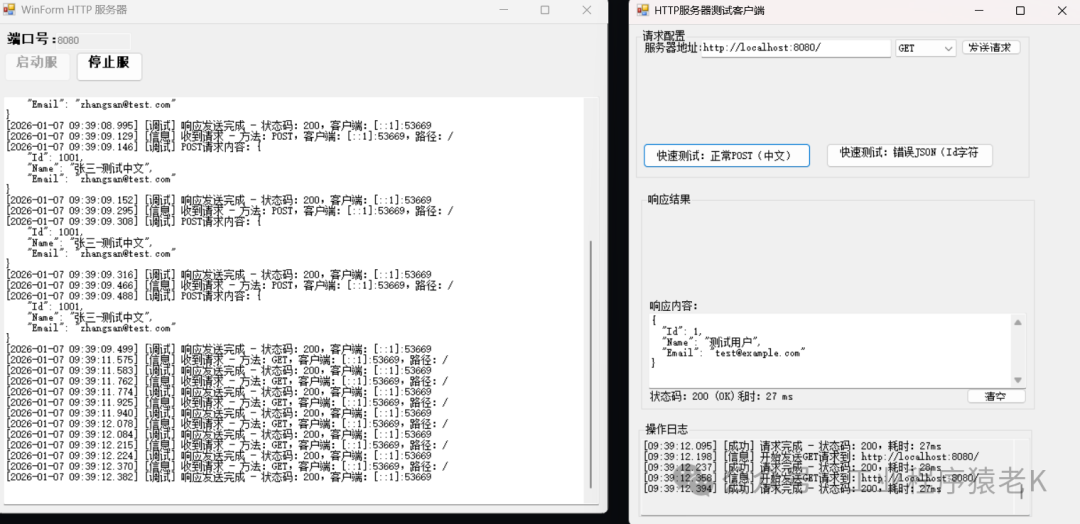
WinForm 客户端,支持手动发送 GET/POST 请求、自定义 JSON 内容、查看响应结果和请求日志。
一、WinForm 客户端功能设计
- 1、基础配置:可修改服务器地址 / 端口,一键切换 GET/POST 请求;
- 2、请求编辑:支持自定义 JSON 请求体,内置常用测试模板;
- 3、响应展示:实时显示响应状态码、耗时、响应内容(带格式化);
- 4、日志记录:记录所有请求历史,便于回溯测试过程;
- 5、核心测试场景:快速发送 “正常 POST(含中文)”“错误 JSON(Id 非数字)” 等预设请求。
二、完整 WinForm 客户端代码
1. 窗体设计 + 逻辑(Form1.cs)
using System;using System.Net.Http;using System.Text;using System.Threading.Tasks;using System.Windows.Forms;namespace HttpServerWinFormClient{ public partial class Form1 : Form { private readonly HttpClient _httpClient; private string _baseUrl = "http://localhost:8080/"; public Form1() { InitializeComponent(); _httpClient = new HttpClient { Timeout = TimeSpan.FromSeconds(10) };
txtServerUrl.Text = _baseUrl; cbxMethod.SelectedIndex = 0; txtRequestJson.Text = @"{ ""Id"": 1001, ""Name"": ""张三-测试中文"", ""Email"": ""zhangsan@test.com""}"; ClearResponse(); } #region 界面事件 private async void btnSend_Click(object sender, EventArgs e) { try { btnSend.Enabled = false; ClearResponse(); _baseUrl = txtServerUrl.Text.Trim(); if (string.IsNullOrWhiteSpace(_baseUrl)) { AppendLog("错误:服务器地址不能为空!", LogLevel.Error); btnSend.Enabled = true; return; } var stopwatch = System.Diagnostics.Stopwatch.StartNew(); AppendLog($"开始发送{cbxMethod.Text}请求到:{_baseUrl}", LogLevel.Info); HttpResponseMessage response = null; if (cbxMethod.Text == "GET") { response = await _httpClient.GetAsync(_baseUrl); } else if (cbxMethod.Text == "POST") { string json = txtRequestJson.Text.Trim(); if (string.IsNullOrWhiteSpace(json)) { AppendLog("错误:POST请求体不能为空!", LogLevel.Error); btnSend.Enabled = true; return; } var content = new StringContent(json, Encoding.UTF8, "application/json"); content.Headers.TryAddWithoutValidation("Content-Type", "application/json; charset=utf-8"); response = await _httpClient.PostAsync(_baseUrl, content); } stopwatch.Stop(); string responseContent = await response.Content.ReadAsStringAsync(); lblStatusCode.Text = $"状态码:{(int)response.StatusCode} ({response.StatusCode})"; lblTimeCost.Text = $"耗时:{stopwatch.ElapsedMilliseconds} ms"; txtResponseJson.Text = FormatJson(responseContent); AppendLog($"请求完成 - 状态码:{(int)response.StatusCode},耗时:{stopwatch.ElapsedMilliseconds}ms", LogLevel.Success); } catch (HttpRequestException ex) { AppendLog($"请求异常:{ex.Message}(请检查服务器是否启动/地址是否正确)", LogLevel.Error); } catch (TaskCanceledException) { AppendLog("请求超时:服务器无响应(超时10秒)", LogLevel.Error); } catch (Exception ex) { AppendLog($"未知异常:{ex.Message}", LogLevel.Error); } finally { btnSend.Enabled = true; } } private void btnClear_Click(object sender, EventArgs e) { ClearResponse(); txtLog.Clear(); } private void btnTestNormalPost_Click(object sender, EventArgs e) { cbxMethod.SelectedIndex = 1; txtRequestJson.Text = @"{ ""Id"": 1001, ""Name"": ""张三-测试中文"", ""Email"": ""zhangsan@test.com""}"; AppendLog("已加载【正常POST(含中文)】测试模板", LogLevel.Info); } private void btnTestErrorPost_Click(object sender, EventArgs e) { cbxMethod.SelectedIndex = 1; txtRequestJson.Text = @"{ ""Id"": ""1001a"", ""Name"": ""李四"", ""Email"": ""lisi@test.com""}"; AppendLog("已加载【错误JSON(Id为字符串)】测试模板", LogLevel.Info); } private void cbxMethod_SelectedIndexChanged(object sender, EventArgs e) { panelPostJson.Visible = (cbxMethod.Text == "POST"); } #endregion #region 辅助方法 private void ClearResponse() { lblStatusCode.Text = "状态码:-"; lblTimeCost.Text = "耗时:- ms"; txtResponseJson.Clear(); } private string FormatJson(string json) { if (string.IsNullOrWhiteSpace(json)) return ""; try { dynamic parsedJson = Newtonsoft.Json.JsonConvert.DeserializeObject(json); return Newtonsoft.Json.JsonConvert.SerializeObject(parsedJson, Newtonsoft.Json.Formatting.Indented); } catch { return json; } } private enum LogLevel { Info, Success, Error } private void AppendLog(string message, LogLevel level = LogLevel.Info) { if (txtLog.InvokeRequired) { txtLog.Invoke(new Action<string, LogLevel>(AppendLog), message, level); return; } string timeStr = $"[{DateTime.Now:HH:mm:ss.fff}]"; string levelStr = level switch { LogLevel.Info => "[信息]", LogLevel.Success => "[成功]", LogLevel.Error => "[错误]", _ => "[未知]" }; string logLine = $"{timeStr} {levelStr} {message}{Environment.NewLine}"; txtLog.AppendText(logLine); txtLog.SelectionStart = txtLog.TextLength; txtLog.ScrollToCaret(); } #endregion #region 窗体设计器代码(自动生成) private System.ComponentModel.IContainer components = null; private TextBox txtServerUrl; private Label label1; private ComboBox cbxMethod; private Button btnSend; private Panel panelPostJson; private Label label2; private TextBox txtRequestJson; private Label label3; private TextBox txtResponseJson; private Label lblStatusCode; private Label lblTimeCost; private Button btnClear; private GroupBox groupBox1; private GroupBox groupBox2; private GroupBox groupBox3; private TextBox txtLog; private Button btnTestNormalPost; private Button btnTestErrorPost; protected override void Dispose(bool disposing) { if (disposing && (components != null)) { components.Dispose(); } _httpClient?.Dispose(); base.Dispose(disposing); } private void InitializeComponent() { this.txtServerUrl = new System.Windows.Forms.TextBox(); this.label1 = new System.Windows.Forms.Label(); this.cbxMethod = new System.Windows.Forms.ComboBox(); this.btnSend = new System.Windows.Forms.Button(); this.panelPostJson = new System.Windows.Forms.Panel(); this.txtRequestJson = new System.Windows.Forms.TextBox(); this.label2 = new System.Windows.Forms.Label(); this.label3 = new System.Windows.Forms.Label(); this.txtResponseJson = new System.Windows.Forms.TextBox(); this.lblStatusCode = new System.Windows.Forms.Label(); this.lblTimeCost = new System.Windows.Forms.Label(); this.btnClear = new System.Windows.Forms.Button(); this.groupBox1 = new System.Windows.Forms.GroupBox(); this.btnTestErrorPost = new System.Windows.Forms.Button(); this.btnTestNormalPost = new System.Windows.Forms.Button(); this.groupBox2 = new System.Windows.Forms.GroupBox(); this.groupBox3 = new System.Windows.Forms.GroupBox(); this.txtLog = new System.Windows.Forms.TextBox(); this.panelPostJson.SuspendLayout(); this.groupBox1.SuspendLayout(); this.groupBox2.SuspendLayout(); this.groupBox3.SuspendLayout(); this.SuspendLayout(); this.txtServerUrl.Location = new System.Drawing.Point(85, 15); this.txtServerUrl.Name = "txtServerUrl"; this.txtServerUrl.Size = new System.Drawing.Size(250, 23); this.txtServerUrl.TabIndex = 0; this.label1.AutoSize = true; this.label1.Location = new System.Drawing.Point(10, 18); this.label1.Name = "label1"; this.label1.Size = new System.Drawing.Size(69, 17); this.label1.TabIndex = 1; this.label1.Text = "服务器地址:"; this.cbxMethod.DropDownStyle = System.Windows.Forms.ComboBoxStyle.DropDownList; this.cbxMethod.Items.AddRange(new object[] { "GET", "POST" }); this.cbxMethod.Location = new System.Drawing.Point(341, 15); this.cbxMethod.Name = "cbxMethod"; this.cbxMethod.Size = new System.Drawing.Size(80, 25); this.cbxMethod.TabIndex = 2; this.cbxMethod.SelectedIndexChanged += new System.EventHandler(this.cbxMethod_SelectedIndexChanged); this.btnSend.Location = new System.Drawing.Point(427, 15); this.btnSend.Name = "btnSend"; this.btnSend.Size = new System.Drawing.Size(80, 25); this.btnSend.TabIndex = 3; this.btnSend.Text = "发送请求"; this.btnSend.UseVisualStyleBackColor = true; this.btnSend.Click += new System.EventHandler(this.btnSend_Click); this.panelPostJson.Controls.Add(this.txtRequestJson); this.panelPostJson.Controls.Add(this.label2); this.panelPostJson.Location = new System.Drawing.Point(10, 45); this.panelPostJson.Name = "panelPostJson"; this.panelPostJson.Size = new System.Drawing.Size(497, 120); this.panelPostJson.TabIndex = 4; this.txtRequestJson.Dock = System.Windows.Forms.DockStyle.Fill; this.txtRequestJson.Multiline = true; this.txtRequestJson.Name = "txtRequestJson"; this.txtRequestJson.ScrollBars = System.Windows.Forms.ScrollBars.Vertical; this.txtRequestJson.Size = new System.Drawing.Size(497, 95); this.txtRequestJson.TabIndex = 1; this.label2.AutoSize = true; this.label2.Location = new System.Drawing.Point(0, 0); this.label2.Name = "label2"; this.label2.Size = new System.Drawing.Size(79, 17); this.label2.TabIndex = 0; this.label2.Text = "POST请求体:"; this.label3.AutoSize = true; this.label3.Location = new System.Drawing.Point(10, 170); this.label3.Name = "label3"; this.label3.Size = new System.Drawing.Size(79, 17); this.label3.TabIndex = 5; this.label3.Text = "响应内容:"; this.txtResponseJson.Location = new System.Drawing.Point(10, 190); this.txtResponseJson.Multiline = true; this.txtResponseJson.Name = "txtResponseJson"; this.txtResponseJson.ScrollBars = System.Windows.Forms.ScrollBars.Vertical; this.txtResponseJson.Size = new System.Drawing.Size(497, 120); this.txtResponseJson.TabIndex = 6; this.lblStatusCode.AutoSize = true; this.lblStatusCode.Location = new System.Drawing.Point(10, 315); this.lblStatusCode.Name = "lblStatusCode"; this.lblStatusCode.Size = new System.Drawing.Size(53, 17); this.lblStatusCode.TabIndex = 7; this.lblStatusCode.Text = "状态码:-"; this.lblTimeCost.AutoSize = true; this.lblTimeCost.Location = new System.Drawing.Point(120, 315); this.lblTimeCost.Name = "lblTimeCost"; this.lblTimeCost.Size = new System.Drawing.Size(65, 17); this.lblTimeCost.TabIndex = 8; this.lblTimeCost.Text = "耗时:- ms"; this.btnClear.Location = new System.Drawing.Point(427, 310); this.btnClear.Name = "btnClear"; this.btnClear.Size = new System.Drawing.Size(80, 25); this.btnClear.TabIndex = 9; this.btnClear.Text = "清空"; this.btnClear.UseVisualStyleBackColor = true; this.btnClear.Click += new System.EventHandler(this.btnClear_Click); this.groupBox1.Controls.Add(this.btnTestErrorPost); this.groupBox1.Controls.Add(this.btnTestNormalPost); this.groupBox1.Controls.Add(this.txtServerUrl); this.groupBox1.Controls.Add(this.label1); this.groupBox1.Controls.Add(this.cbxMethod); this.groupBox1.Controls.Add(this.btnSend); this.groupBox1.Controls.Add(this.panelPostJson); this.groupBox1.Location = new System.Drawing.Point(10, 10); this.groupBox1.Name = "groupBox1"; this.groupBox1.Size = new System.Drawing.Size(517, 180); this.groupBox1.TabIndex = 10; this.groupBox1.TabStop = false; this.groupBox1.Text = "请求配置"; this.btnTestNormalPost.Location = new System.Drawing.Point(10, 170); this.btnTestNormalPost.Name = "btnTestNormalPost"; this.btnTestNormalPost.Size = new System.Drawing.Size(150, 25); this.btnTestNormalPost.TabIndex = 5; this.btnTestNormalPost.Text = "快速测试:正常POST(中文)"; this.btnTestNormalPost.UseVisualStyleBackColor = true; this.btnTestNormalPost.Click += new System.EventHandler(this.btnTestNormalPost_Click); this.btnTestErrorPost.Location = new System.Drawing.Point(166, 170); this.btnTestErrorPost.Name = "btnTestErrorPost"; this.btnTestErrorPost.Size = new System.Drawing.Size(150, 25); this.btnTestErrorPost.TabIndex = 6; this.btnTestErrorPost.Text = "快速测试:错误JSON(Id字符串)"; this.btnTestErrorPost.UseVisualStyleBackColor = true; this.btnTestErrorPost.Click += new System.EventHandler(this.btnTestErrorPost_Click); this.groupBox2.Controls.Add(this.label3); this.groupBox2.Controls.Add(this.txtResponseJson); this.groupBox2.Controls.Add(this.lblStatusCode); this.groupBox2.Controls.Add(this.lblTimeCost); this.groupBox2.Controls.Add(this.btnClear); this.groupBox2.Location = new System.Drawing.Point(10, 195); this.groupBox2.Name = "groupBox2"; this.groupBox2.Size = new System.Drawing.Size(517, 340); this.groupBox2.TabIndex = 11; this.groupBox2.TabStop = false; this.groupBox2.Text = "响应结果"; this.groupBox3.Controls.Add(this.txtLog); this.groupBox3.Location = new System.Drawing.Point(10, 540); this.groupBox3.Name = "groupBox3"; this.groupBox3.Size = new System.Drawing.Size(517, 150); this.groupBox3.TabIndex = 12; this.groupBox3.TabStop = false; this.groupBox3.Text = "操作日志"; this.txtLog.Dock = System.Windows.Forms.DockStyle.Fill; this.txtLog.Multiline = true; this.txtLog.Name = "txtLog"; this.txtLog.ReadOnly = true; this.txtLog.ScrollBars = System.Windows.Forms.ScrollBars.Vertical; this.txtLog.Size = new System.Drawing.Size(517, 125); this.txtLog.TabIndex = 0; this.AutoScaleDimensions = new System.Drawing.SizeF(7F, 17F); this.AutoScaleMode = System.Windows.Forms.AutoScaleMode.Font; this.ClientSize = new System.Drawing.Size(539, 700); this.Controls.Add(this.groupBox3); this.Controls.Add(this.groupBox2); this.Controls.Add(this.groupBox1); this.Name = "Form1"; this.Text = "HTTP服务器测试客户端"; this.panelPostJson.ResumeLayout(false); this.panelPostJson.PerformLayout(); this.groupBox1.ResumeLayout(false); this.groupBox1.PerformLayout(); this.groupBox2.ResumeLayout(false); this.groupBox2.PerformLayout(); this.groupBox3.ResumeLayout(false); this.groupBox3.PerformLayout(); this.ResumeLayout(false); } #endregion }}
三、客户端使用准备
- 1、安装依赖:在 NuGet 包管理器中安装
Newtonsoft.Json(用于 JSON 格式化); - 2、环境要求:.NET Framework 4.7.2+ 或 .NET 6/7/8(WinForm);
- 3、服务器准备:先启动之前的 WinForm HTTP 服务器(管理员身份,端口默认 8080)。
四、客户端使用教程
1. 基础操作
- 1、配置服务器地址:
- 在 “服务器地址” 输入框中填写http://localhost:8080/与服务器端口一致);
- 2、选择请求方法:
- POST:需填写 JSON 请求体(或使用快速测试模板);
- 3、发送请求:
- 点击 “发送请求” 按钮,等待响应;
- 4、查看结果:
阅读原文:https://mp.weixin.qq.com/s/jDoi5Hz9tHaGwhfZd5rRYw
https://download.csdn.net/download/kylezhao2019/92541342
源码下载:https://download.csdn.net/download/kylezhao2019/92541343
该文章在 2026/1/19 10:42:06 编辑过





 400 186 1886